Spoiler
Microsoft.office.word –> mail merge
The task
Yesterday I received an interesting task.
A team outside of ours had created a single column table within the TempDB database (AKA the redaction table) and our task is to DELETE the content from all tables from three major databases based on the id listed in the redaction table.
Step 1 – Create the “To Do List”.
Since our architecture dictates that columns with the same data, especially KEY columns that are used to JOIN tables will be named exactly the same, I have queried the INFORMATION_SCHEMA.COLUMNS DVM to get all the tables that contain this key column.
The query resulted 150 tables I need to process (JOIN & DELETE) with row count between 100M to 1B each.
Step 2 – Perfecting the script.
After getting the list of tables I need to redact data from, I have created my script (see following) that joins the first table with the reduction table and DELETE the matching rows in batches of 2,500 to avoid table locks.
Step 3 – The magic.
Of course, the obvious solution would be to (1) create a #Temp_Table and INSERT the table names into it and then (2) Create a loop containing a Dynamic query that merges my query with the #Temp_Table list of tables to process.
While this type of solution is easier to maintain as a long-term solution and I would use it if I were searching for a maintenance process that is; flexible & adjustable. it is also less readable and open to annoying syntax errors.
The solution I have implemented this time was to (1) copy the list of tables I have to process into an excel file, (2) copy my script into a word document and finally (3) using the Mail Merge function I have generated a long, simple & readable script I have copied into the SSMS.
Will I use this method again?
I don't think the correct question is if I will use this method again but when will I use this method again.
when I will have to generate a long "One off" script that I will want to copy & paste into the SSMS and get a syntax check for it, additionally, when I will assume that the execution time might be long, with potential re-runs, I will use this method over the dynamic loop method.
SSMS Screenshot
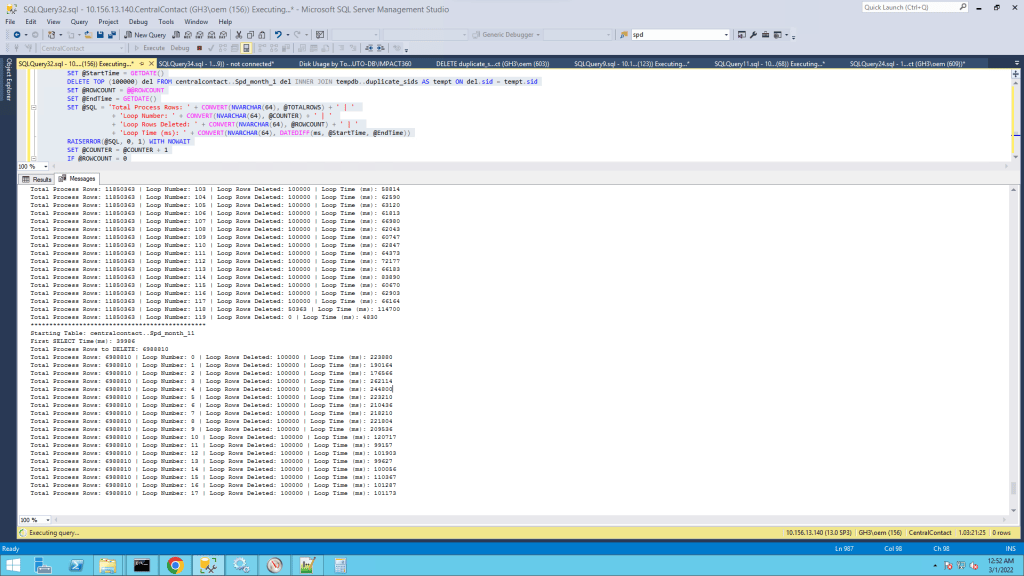
The code before the Mail Merge
SET NOCOUNT ON
DECLARE @StartTime                DATETIME
DECLARE @EndTime                  DATETIME
DECLARE @ROWCOUNT                 INT
DECLARE @COUNTER                  INT=0
DECLARE @SQL                      NVARCHAR(MAX)
DECLARE @TOTALROWS                INT

SET @SQL = 'Starting Table: MyDatabaes..First_Table'
RAISERROR(@SQL, 0, 1) WITH NOWAIT
SET @StartTime = GETDATE()

SELECT @TOTALROWS = COUNT(*) from MyDatabaes..First_Table del INNER JOIN tempdb.. reduction AS tempt ON del.sid = tempt.sid

SET @EndTime = GETDATE()
SET @SQL = 'First SELECT Time(ms): ' + CONVERT(NVARCHAR(64), DATEDIFF(ms, @StartTime, @EndTime))
RAISERROR(@SQL, 0, 1) WITH NOWAIT
SET @SQL = 'Total Process Rows to DELETE: ' + CONVERT(NVARCHAR(64), @TOTALROWS)
RAISERROR(@SQL, 0, 1) WITH NOWAIT

IF @TOTALROWS > 0
BEGIN
       WHILE 1 = 1
       BEGIN
              SET @StartTime = GETDATE()
              DELETE TOP (100000) del FROM MyDatabaes..First_Table del INNER JOIN tempdb..duplicate_sids AS tempt ON del.sid = tempt.sid
              SET @ROWCOUNT = @@ROWCOUNT
              SET @EndTime = GETDATE()
              SET @SQL = 'Total Process Rows: ' + CONVERT(NVARCHAR(64), @TOTALROWS) + ' | '
                                  + 'Loop Number: ' + CONVERT(NVARCHAR(64), @COUNTER) + ' | '
                                  + 'Loop Rows Deleted: ' + CONVERT(NVARCHAR(64), @ROWCOUNT) + ' | '
                                  + 'Loop Time (ms): ' + CONVERT(NVARCHAR(64), DATEDIFF(ms, @StartTime, @EndTime))
              RAISERROR(@SQL, 0, 1) WITH NOWAIT
              SET @COUNTER = @COUNTER + 1
              IF @ROWCOUNT = 0
                     BEGIN
                           SET @SQL = '***********************************************'
                           RAISERROR(@SQL, 0, 1) WITH NOWAIT
                           RETURN
                     END --IF @ROWCOUNT = 0
       END --WHILE 1 = 1
END --IF @TOTALROWS > 0
GO


כתיבת תגובה